Introduction
This project started off as my exploration of bringing different people's drawings together onto a big canvas. I began to research and learnt about the WebSocket protocol, which allows the client (webpage) and the server to establish a lasting connection and enables the server to push real-time updates to the client. With the help of this protocol, I experimented with several narratives and settled on a collaborative story creating experience. Which involves up to 8 participants scanning a QR code on the big canvas to open up their individual drawing board with a one-sentence prompt and draw a scene of the story, then the story is put together on the big canvas for everyone to see. In addition, to add more fun to this experience, I plugged into the OpenAI API so that the setting of the story, as well as the prompts for participants to draw their scenes, can be generated by ChatGPT, meaning that the story will be different and random every time. The goal of this project is to create a fun experience of incorporating different people's styles and interpretations into one final outcome.
Timeline
First Week
- Research about the WebSocket protocol and learnt about implementing it though the backend framework I know--Django (in Python).
- Built a simple "drawing board" (or text input board) webpage.
- Built the first prototype where a text entered on a webpage on my phone can be displayed in real-time on a p5.js canvas on my laptop.
Second Week
- Found and tuned a brushstroke on p5.js to be used for the drawing board.
- Researched and learnt how to embed the p5.js canvas on a webpage.
- Created the webpage for the individual drawing board.
- Added an eraser and clear canvas option to the drawing board.
- Researched and figured out how to export the content of a p5.js canvas into base64 encoded image string.
- On the server side, found out how to convert the base64 string back into an image file and store it on the server.
- Built a second prototype where drawings and texts entered on a webpage on my phone can be displayed in real-time on a p5.js canvas on my laptop.
Third Week
- Started to build the webpages for the big canvas.
- To ensure that I could easily manage the stories created, I built a simple "dashboard" that requires admin login to make sure it is secure.
- On the dashboard, I could create a new story, or delete any existing stories.
- For the big canvas, I used a js library to create a stylish QR code to be displayed on the webpage.
- I programmed the backend server to store the sequence of each participant and allowing them to draw one by one.
- After each participant has finished, there will be a checkmark displayed on the big canvas
- When all eight participants have finished, the story will be revealed
- I used another js library to convert the elements on a webpage into an image, so after the story is completed, people can scan the QR code again and download an image of the story they just participated in drawing.
- I learnt about the OpenAI API and implemented it though my backend server, so that every time I click "create new story" on my dashboard, the server will send a request to OpenAI and get the story's title, setting and the 8 prompts.
- To make sure the story generated is simple and easy to draw, I drafted a (quite long) prompt for ChatGPT to generate the story
Code
Backend (Python Django)
For handling WebSocket requests, here's my consumers.py file. There are 3 main functions:
The connect() function is to handle when a new client (webpage) establishes connection to the server using the WebSocket protocol, in this case, my code determines whether the client is a drawing board or the big canvas by the parameter passed in the URL, and handle both cases accordingly. A group name is attached to each client to easily identify them.
The disconnect() function is to handle when the connection to a client is terminated, in this case, my code simply removes the group name of the client.
The receive() function is used when a client which is already connected sends a message to the server, such as when the participant clicks upload on their drawing board or when the story is finished and the big canvas sends an image of the entire story for participants to download.
The other two functions is to send data to a client. The add_board() function is to send the drawing of a scene to the big canvas and the draw_status() function is to send instructions to the drawing board webpage to tell if it's their turn to draw.
import json
from canvas.models import Story, DrawingBoard
import base64
from django.core.files.base import ContentFile
from channels.generic.websocket import WebsocketConsumer
from asgiref.sync import async_to_sync

class MyConsumer(WebsocketConsumer):
    def connect(self):
        if self.scope['url_route']['kwargs']['command'][:5] == "story":
            try:
                myStory = Story.objects.get(code=self.scope['url_route']['kwargs']['command'][5:])
                async_to_sync(self.channel_layer.group_add)(
                    self.scope['url_route']['kwargs']['command'], self.channel_name
                )
                self.accept()
            except:
                self.close()
            return
        elif self.scope['url_route']['kwargs']['command'][:4] == "draw":
            try:
                myBoard = DrawingBoard.objects.get(code=self.scope['url_route']['kwargs']['command'][4:])
                myStory = Story.objects.get(code=myBoard.storyCode)
                async_to_sync(self.channel_layer.group_add)(
                    self.scope['url_route']['kwargs']['command'], self.channel_name
                )
                self.accept()
                message = "pending"
                if myBoard.sequence == myStory.numberOfScenes + 1:
                    message = "drawing-" + myBoard.description
                elif myBoard.sequence < myStory.numberOfScenes + 1:
                    message = "finished"

                async_to_sync(self.channel_layer.group_send)(
                    self.scope['url_route']['kwargs']['command'],
                    {
                        'type': 'draw_status',
                        'message': message
                    }
                )
            except:
                self.close()
            return
        self.close()

    def disconnect(self, close_code):
        if self.scope['url_route']['kwargs']['command'][:5] == "story":
            async_to_sync(self.channel_layer.group_discard)(
                self.scope['url_route']['kwargs']['command'], self.channel_name
            )
        elif self.scope['url_route']['kwargs']['command'][:4] == "draw":
            async_to_sync(self.channel_layer.group_discard)(
                self.scope['url_route']['kwargs']['command'], self.channel_name
            )

    def receive(self, text_data):
        if self.scope['url_route']['kwargs']['command'][:4] == "draw":
            try:
                text_data_json = json.loads(text_data)
                storyCode = text_data_json['code']
                image = text_data_json['image']

                myBoard = DrawingBoard.objects.get(code=self.scope['url_route']['kwargs']['command'][4:])
                myStory = Story.objects.get(code=myBoard.storyCode)

                format, imgstr = image.split(';base64,')
                print("format", format)
                ext = format.split('/')[-1]

                data = ContentFile(base64.b64decode(imgstr))
                file_name = self.scope['url_route']['kwargs']['command'][4:] + "." + ext
                myBoard.image.save(file_name, data, save=True)
                myBoard.save()

                myStory.numberOfScenes += 1
                myStory.save()

                async_to_sync(self.channel_layer.group_send)(
                    storyCode,
                    {
                        'type': 'add_board',
                        'image': "/files/drawing-images/" + file_name,
                        'message': myStory.numberOfScenes,
                    }
                )

                if myStory.numberOfBoards > myBoard.sequence:
                    nextBoard = DrawingBoard.objects.get(sequence=myBoard.sequence+1)
                    async_to_sync(self.channel_layer.group_send)(
                        "draw" + nextBoard.code,
                        {
                            'type': 'draw_status',
                            'message': "drawing-" + nextBoard.description
                        }
                    )
            except:
                self.close()
        elif self.scope['url_route']['kwargs']['command'][:5] == "story":
            try:
                text_data_json = json.loads(text_data)
                storyCode = text_data_json['code']
                image = text_data_json['image']

                myStory = Story.objects.get(code=storyCode)

                format, imgstr = image.split(';base64,')
                print("format", format)
                ext = format.split('/')[-1]

                data = ContentFile(base64.b64decode(imgstr))
                file_name = self.scope['url_route']['kwargs']['command'][4:] + "." + ext
                myStory.image.save(file_name, data, save=True)
            except:
                self.close()

    def add_board(self, event):
        image = event['image']
        message = event['message']
        self.send(text_data=json.dumps({
            'image': image,
            'message': message,
        }))

    def draw_status(self, event):
        message = event['message']
        self.send(text_data=json.dumps({
            'message': message
        }))
For handling regular HTTP requests, here's my views.py file. Each function in here corresponds to a URL pattern and many of them returns a webpage HTML file.
from django.shortcuts import render, redirect
from django.http import HttpResponse
from django.views.decorators.csrf import csrf_exempt
from .models import Story, DrawingBoard
import secrets, time
from django.contrib.auth import authenticate, login, logout

from openai import OpenAI

@csrf_exempt
def story(request, code):
    if request.user.is_authenticated and request.user.is_superuser:
        myStory = Story.objects.get(code=code)
        scenes = DrawingBoard.objects.filter(storyCode=code)
        return render(request, 'story.html', {"story": myStory, "scenes": scenes})
    return redirect("/login/")

@csrf_exempt
def manage(request, code):
    if request.user.is_authenticated and request.user.is_superuser:
        myStory = Story.objects.get(code=code)
        scenes = DrawingBoard.objects.filter(storyCode=code)
        return render(request, 'manage.html', {"story": myStory, "scenes": scenes})
    return redirect("/login/")

@csrf_exempt
def stories(request):
    if request.method == 'GET':
        if request.user.is_authenticated and request.user.is_superuser:

            myStories = Story.objects.all()
            return render(request, 'stories.html', {"stories": myStories})
        else:
            return redirect("/login/")

@csrf_exempt
def full(request):
    return render(request, 'full.html')

@csrf_exempt
def download(request, code):
    myStory = Story.objects.get(code=code)
    if myStory.image != "":
        return render(request, "download.html", {"story": myStory})
    return HttpResponse(status=404)

@csrf_exempt
def newStory(request):
    if request.user.is_authenticated and request.user.is_superuser:
        value = ''
        while True:
            value = secrets.token_urlsafe(8)
            try:
                object = Story.objects.get(code=value)
            except:
                break

        try:
            client = OpenAI()

            completion = client.chat.completions.create(
                model="gpt-4o-mini",
                messages=[
                    {"role": "system", "content": "You are a helpful assistant that strictly follows the formatting instructions."},
                    {
                        "role": "user",
                        "content": "draft a short story that can be drawn by 8 ordinary people with average drawing skills, they will only draw in black and white, so no colors need to be specified, each responsible for 1 frame, give a title, as well as the background and setting of the story in 50 words with detail and then provide 1 one-sentence prompt to each person, the story should be simple and do not involve more than 3 different characters, the characters don’t need to be specified, the prompts should not be instructions but descriptions and should be brief and leave a bit space for imagination, the frames should be easy to draw. In terms of format, output in plane text without any headings or special characters, separate the title, setting section and the prompt section with a |, and separate each prompt in the prompt section with a /, do not include line breaks (forward slash n)"
                    }
                ]
            )

            content = completion.choices[0].message.content.split("|")
            myNewStory = Story(code=value, title=content[0].strip(), beginning=content[1].strip(), prompts=content[2].strip())
            myNewStory.save()
        except:
            return HttpResponse(status=400)
        return redirect("/story/" + value + "/")
    return redirect("/login/")

@csrf_exempt
def draw(request, code):
    try:
        myBoard = DrawingBoard.objects.get(code=code)
        myStory = Story.objects.get(code=myBoard.storyCode)
        return render(request, 'draw.html', {"board": myBoard, "story": myStory})
    except:
        return HttpResponse(status=404)

@csrf_exempt
def newDraw(request, code):
    try:
        myStory = Story.objects.get(code=code)

        if myStory.numberOfBoards >= 8:
            if myStory.numberOfScenes == 8 and myStory.image != "":
                return redirect("/download/" + code + "/")
            else:
                return redirect("/full/")

        value = ''
        while True:
            value = secrets.token_urlsafe(8)
            try:
                object1 = Story.objects.get(code=value)
                object2 = DrawingBoard.objects.get(code=value)
            except:
                break
        prompt = myStory.prompts.split("/")[myStory.numberOfBoards].strip()
        myNewBoard = DrawingBoard(storyCode=code, code=value, sequence=myStory.numberOfBoards+1, description=prompt)
        myNewBoard.save()

        myStory.numberOfBoards += 1
        myStory.save()
        return redirect("/draw/" + value + "/")
    except:
        return HttpResponse(status=404)

@csrf_exempt
def deleteDraw(request, code):
    try:
        myBoard = DrawingBoard.objects.get(code=code)
        myStory = Story.objects.get(code=myBoard.storyCode)

        allBoards = DrawingBoard.objects.filter(storyCode=myBoard.storyCode).order_by("-sequence")
        for counter in range(len(allBoards)):
            if allBoards[counter].sequence > myBoard.sequence:
                print(counter)
                allBoards[counter].description = allBoards[counter + 1].description
                allBoards[counter].sequence -= 1
                allBoards[counter].save()
        myBoard.delete()
        myStory.numberOfBoards -= 1
        myStory.save()
        return HttpResponse(status=200)
    except:
        return HttpResponse(status=404)

@csrf_exempt
def delete(request, code):
    if request.method == 'GET':
        time.sleep(2)
        if request.user.is_authenticated and request.user.is_superuser:
            myStory = Story.objects.get(code=code)
            myStory.delete()
            scenes = DrawingBoard.objects.filter(storyCode=code)
            for scene in scenes:
                scene.delete()
            return HttpResponse(status=200)
        else:
            return HttpResponse(status=400)

@csrf_exempt
def userLogin(request):
    if request.method == 'GET':
        if request.user.is_authenticated and request.user.is_superuser:
            return redirect("/")
        else:
            return render(request, "login.html", {})

@csrf_exempt
def loginRequest(request):
    if request.method == 'POST':
        # time.sleep(1)
        id = request.POST['id']
        password = request.POST['password']
        remember = request.POST['remember']
        print(remember)
        user = authenticate(username=id, password=password)
        if user is not None:
            login(request, user)
            if not remember:
                request.session.set_expiry(0)
            return HttpResponse(status=200)
        else:
            return HttpResponse(status=400)

@csrf_exempt
def changePassword(request):
    if request.method == 'POST':
        if request.user.is_authenticated and request.user.is_superuser:
            passwordOld = request.POST['passwordOld']
            passwordNew = request.POST['passwordNew']

            user = authenticate(username=request.user.username, password=passwordOld)
            if user is not None:
                user = request.user
                user.set_password(passwordNew)
                user.save()
                user = authenticate(username=request.user.username, password=passwordNew)
                login(request, user)
                return HttpResponse(status=200)
            else:
                return HttpResponse(status=400)
        return HttpResponse(status=400)

@csrf_exempt
def userLogout(request):
    logout(request)
    return redirect("/login/")
To handle different URL patterns, here's my urls.py file.
from django.urls import path
from . import views

urlpatterns = [
    path('story//', views.story, name='draw'),
    path('story/', views.newStory, name='newStory'),
    path('stories/', views.stories, name='stories'),
    path('draw//', views.draw, name='draw'),
    path('new-board//', views.newDraw, name='newDraw'),
    path('delete-board//', views.deleteDraw, name='deleteDraw'),
    path('download//', views.download, name='download'),
    path('manage//', views.manage, name='manage'),
    path('delete//', views.delete, name='delete'),
    path('full/', views.full, name='full'),
    path('login/', views.userLogin, name='login'),
    path('login-request/', views.loginRequest, name='loginRequest'),
    path('logout/', views.userLogout, name="logout"),
    path('change-password/', views.changePassword, name="changePassword"),
]
Frontend (HTML, CSS, JS)
Here's what the big canvas webpage looks like:
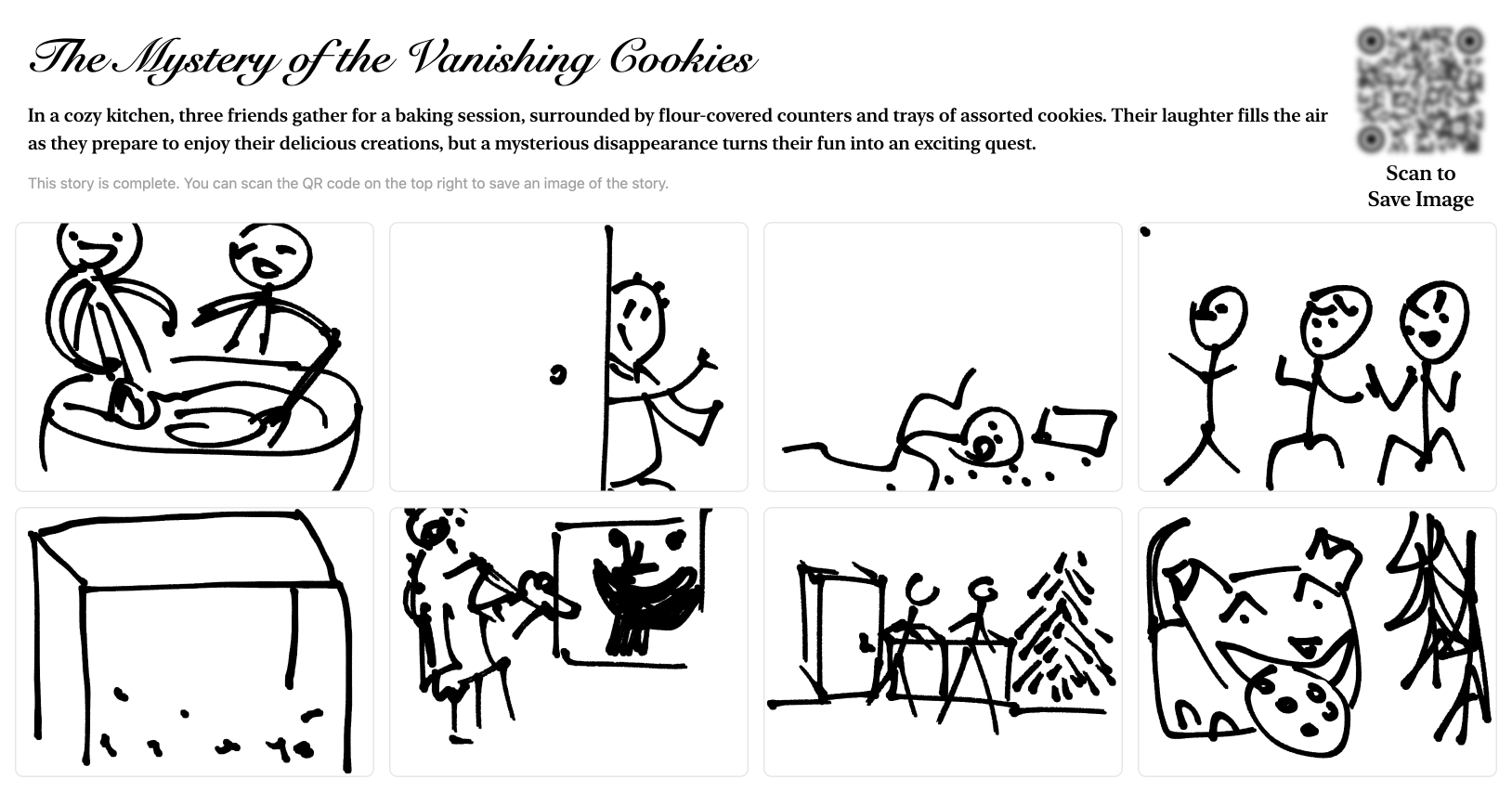
Here's what the individual drawing board webpage looks like:
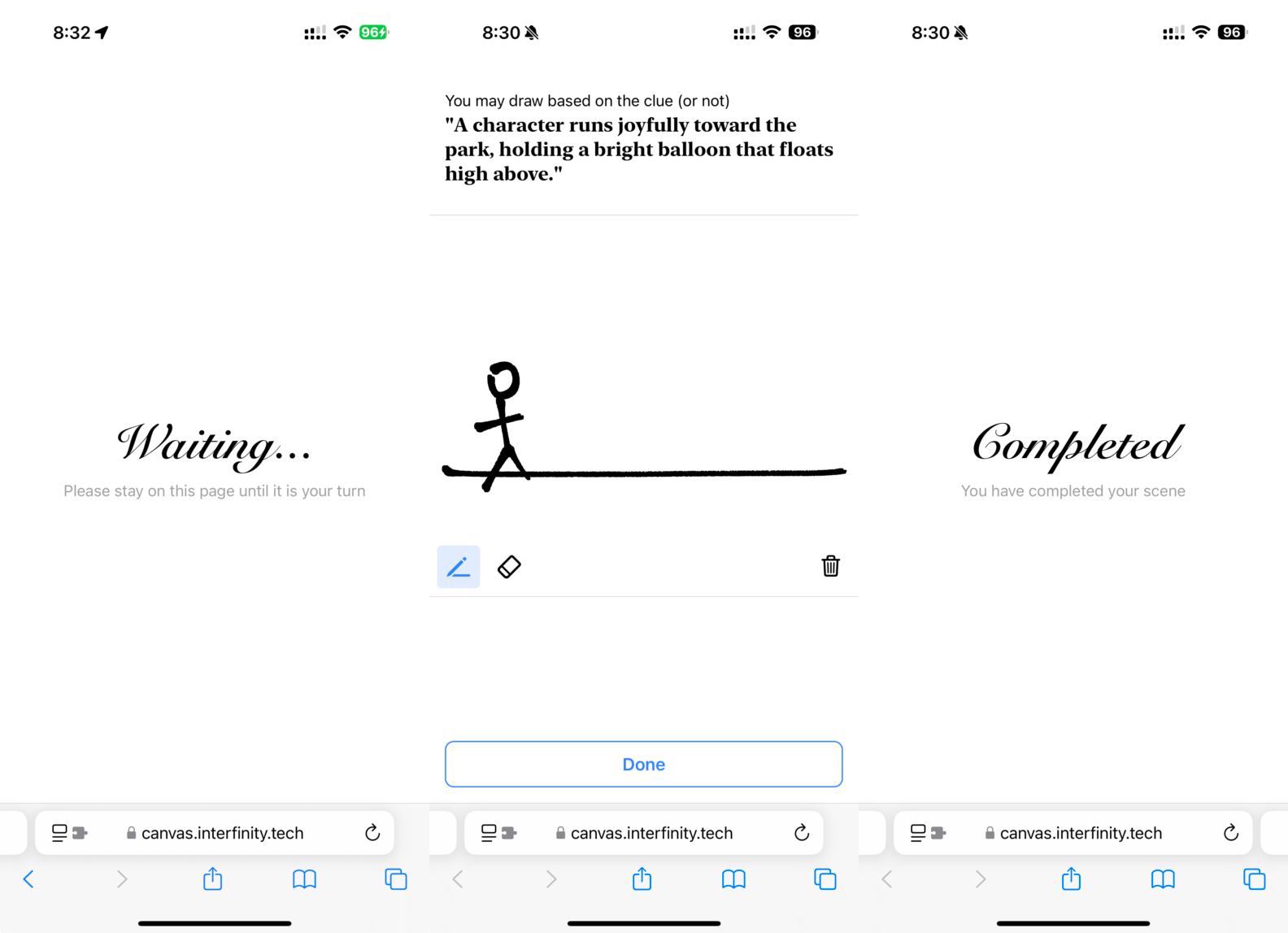
References
- p5.js https://p5js.org
- QR Code Styling https://qr-code-styling.com
- HTML2Canvas https://html2canvas.hertzen.com
- Django Channels and Daphne https://channels.readthedocs.io/en/latest/
Successes & Challenges
I'm glad that the final outcome is at least working. I've spent more time debugging and trying to solve problems with my server when deploying my project than the actual time spent on writing the code. To deploy my Django project which handles both HTTP and WebSocket requests is much harder than just HTTP. I needed to use a library named Daphne for the WebSocket requests, and it just ran into problems all the time. Luckily, after reading countless posts online and experimenting with all kinds of methods, I managed to get it to work. Also, I hesitated between letting ChatGPT generating the story plot every time or just sticking with a predefined story, but after seeing the results ChatGPT is capable of, I decided to go with it. In the future, I could add more options to creating the story, such as just typing or a combination of typing and drawing, also, I could experiment with letting different participants draw different parts of the same scene and putting them together.